Product Photoshoot turns a plain product photo into a professional, scene-ready shot — studio lighting, lifestyle backdrops, seasonal settings — without booking a studio. This guide covers the four things that matter: what it is, when to reach for it, where the images go, and how to use it start to finish.
What Product Photoshoot is
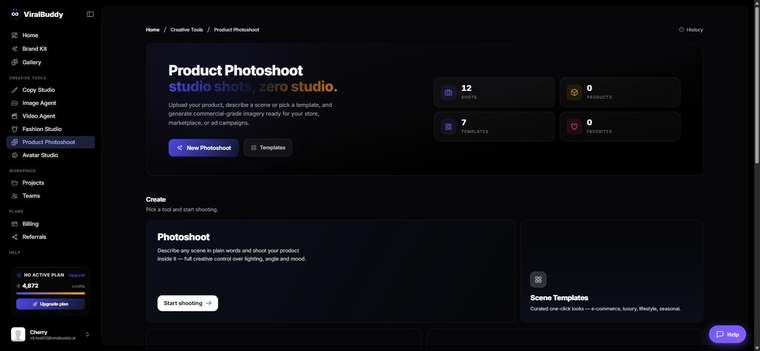
Product Photoshoot is ViralBuddy's tool for placing your real product into beautiful, believable scenes. Upload a photo of the product — ideally on a clean background — describe the setting you want, and it generates polished shots that keep your product accurate while changing the world around it. Your Brand Kit keeps the look consistent across every image.
When to use it
Reach for Product Photoshoot whenever you need product imagery that looks shot on location:
- E-commerce & catalog — clean, consistent shots for every SKU.
- Lifestyle ads — your product in a real-world moment that sells the feeling.
- Seasonal & promo — refresh the setting for holidays or launches without a reshoot.
- Marketplaces — Amazon, Shopify and Etsy-ready imagery in minutes.
Where to use the output
The shots slot straight into wherever you sell and market:
- Storefronts: Shopify, Amazon, Etsy, your own product pages.
- Paid social: Meta/Instagram, Pinterest, TikTok product ads.
- Owned: email, landing pages, lookbooks and catalogs.
How to use Product Photoshoot (step by step)
- Open Product Photoshoot from the Creative Tools menu. Open it here →
- Upload your product photo. A clean, well-lit shot on a plain background works best.
- Describe the scene — e.g. "on a marble kitchen counter, soft morning light, fresh herbs blurred behind."
- Generate and compare. Produce a few settings and pick the ones that fit the campaign.
- Refine details like angle, surface and lighting until the product looks its best.
- Download and publish to your store, ads or catalog.
Pro tips
- Start clean. The better your source photo, the more accurate the final scene.
- Describe the surface and light. "Matte concrete, hard directional light" reads very differently from "warm oak, soft glow."
- Keep a consistent set. Use the same scene recipe across a product line for a cohesive catalog.
Frequently asked questions
Will my product stay accurate? Yes — the tool preserves your real product while restyling the scene around it.
What source photo works best? A clean, sharp image on a plain background gives the strongest results.
Can I make seasonal versions? Yes — just change the scene description to refresh for any season or promo.
How much does it cost? Generations draw from your shared credit balance — the same pool every ViralBuddy tool uses.
Ready to restyle your product shots? Open Product Photoshoot →



Comments (0)
Be the first to leave a comment.