Fashion Studio is ViralBuddy's toolkit for apparel and fashion brands — put your garments on AI models, swap the model, or change the styling, all without a photoshoot. This guide covers the four things that matter: what it is, when to reach for it, where the images go, and how to use it start to finish.
What Fashion Studio is
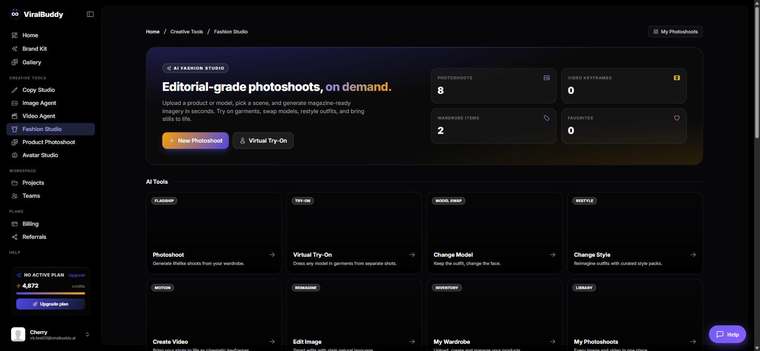
Fashion Studio takes a flat-lay or on-model garment photo and produces professional fashion imagery. Its core moves are Virtual Try-On (put your clothing on a chosen model), Change Model (swap in a different model to show range), and Change Style (restyle the look, pose or setting). Your Brand Kit keeps the aesthetic consistent across the whole set.
When to use it
Reach for Fashion Studio whenever you'd otherwise book models and a studio:
- On-model product shots — show garments worn, not just laid flat.
- Diverse representation — present a piece on a range of models and body types with Change Model.
- Seasonal restyles — new poses, settings and moods with Change Style, no reshoot.
- Fast catalog builds — a full lookbook from your existing flat-lays.
Where to use the output
Fashion Studio imagery is built for where fashion sells:
- Storefronts: Shopify, your own PDPs, marketplaces and lookbooks.
- Paid social: Instagram, TikTok, Pinterest fashion ads.
- Owned: email lookbooks, landing pages and campaign hubs.
How to use Fashion Studio (step by step)
- Open Fashion Studio from the Creative Tools menu. Open it here →
- Upload your garment — a clean flat-lay or existing on-model photo.
- Pick a move: Virtual Try-On to dress a model, Change Model to swap who's wearing it, or Change Style to restyle the shot.
- Choose the model and setting that match your brand and audience.
- Generate and review a few options, keeping the ones that fit the campaign.
- Download and publish to your store, lookbook or ads.
Pro tips
- Use a clean garment shot. Even lighting and a plain background give the most accurate try-on.
- Show range with Change Model. The same piece on different models helps more shoppers see themselves in it.
- Keep styling consistent. Reuse the same setting and mood across a collection for a cohesive lookbook.
Frequently asked questions
What's the difference between the three moves? Virtual Try-On dresses a model in your garment; Change Model swaps the person; Change Style restyles the pose, setting or mood.
Will the garment stay true? Yes — Fashion Studio keeps your clothing accurate while changing the model or styling.
Do I need a model photo to start? No — a clean flat-lay is enough for Virtual Try-On.
How much does it cost? Generations draw from your shared credit balance — the same pool every ViralBuddy tool uses.
Ready to put your line on-model? Open Fashion Studio →

Comments (0)
Be the first to leave a comment.