Copy Studio is where the words get written. Headlines, primary text, hooks, CTAs, product descriptions — all generated in your brand voice, in seconds. This guide covers the four things that matter: what it is, when to reach for it, where the copy goes, and how to use it start to finish.
What Copy Studio is
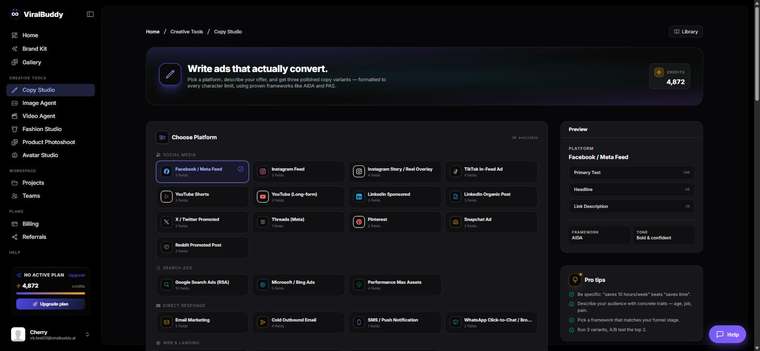
Copy Studio is ViralBuddy's AI copywriter for ads and marketing. Tell it what you're selling and who it's for, pick a tone, and it writes conversion-focused copy — multiple variations at once so you always have options to test. It draws on your Brand Kit so the voice stays consistent, and it can match any format: a punchy TikTok hook, a long-form Facebook primary text, or a tight Google headline.
When to use it
Reach for Copy Studio whenever words are the bottleneck:
- Ad copy at scale — five hooks and three primary texts for every campaign, ready to A/B test.
- Beating writer's block — get a strong first draft you can refine instead of a blank page.
- Product descriptions that sell benefits, not just features.
- Repurposing — turn one message into platform-native versions for each channel.
Where to use the output
Copy Studio's output drops straight into every channel you run:
- Paid social: Meta/Instagram, TikTok, LinkedIn, Pinterest ad copy.
- Search & display: Google headlines and descriptions, Performance Max text assets.
- Owned: landing pages, email subject lines, product pages and SMS.
How to use Copy Studio (step by step)
- Open Copy Studio from the Creative Tools menu. Open it here →
- Describe the offer. What you're selling, the audience, and the one benefit that matters most.
- Pick a tone and format — bold and playful for TikTok, clear and credible for LinkedIn.
- Generate variations. You'll get several angles at once — keep the strongest, regenerate the rest.
- Refine and pair. Tighten the winner, then pair it with a visual from the Image or Video Agent.
- Ship and test. Run 2–3 variants live and let the numbers pick the winner.
Pro tips
- Lead with the benefit. Tell the model the outcome your customer wants, not just the product spec.
- Name the audience. "Busy parents" and "growth marketers" get very different, better copy.
- Test angles, not synonyms. Compare a fear angle vs. an aspiration angle, not two near-identical lines.
Frequently asked questions
Will it sound like my brand? Yes — with your Brand Kit set up, Copy Studio keeps your voice and tone consistent.
How many variations do I get? Multiple per generation, so you always have options to test.
Can it write for any platform? Yes — choose the format and it adapts length and style to fit.
How much does it cost? Generations draw from your shared credit balance — the same pool every ViralBuddy tool uses.
Ready to write your next ad? Open Copy Studio →
Comments (0)
Be the first to leave a comment.