Ad Localizer takes a video you already have and produces natural-sounding versions in other languages — so one winning ad becomes many. It lives inside Avatar Studio. This guide covers what it is, when to use it, where the videos go, and how to use it.
What Ad Localizer is
Ad Localizer translates and re-voices an existing video into new languages, keeping the pacing and feel of the original. Instead of re-shooting per market, you upload one master video and generate localized variants for each audience.
When to use it
- Going global — scale a proven ad into new-language markets.
- Multi-market campaigns that need consistent creative everywhere.
- Fast expansion without booking new shoots or voice talent per region.
Where to use the output
- Paid social by market: localized TikTok, Reels and Shorts.
- Regional landing pages and email in each audience's language.
How to use Ad Localizer (step by step)
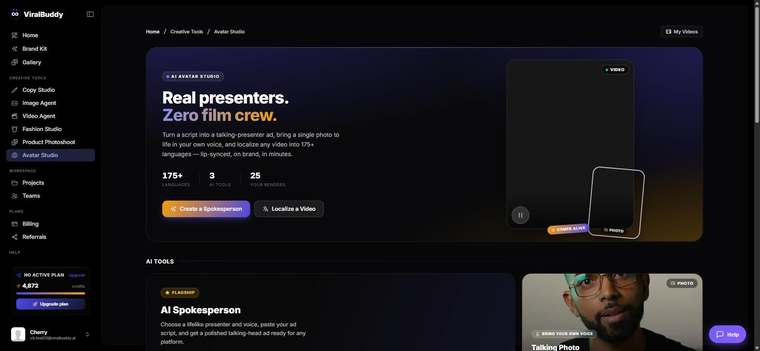
- Open Avatar Studio and choose Ad Localizer. Open it here →
- Upload the video you want to localize.
- Choose the target languages for your markets.
- Generate and review each version for tone and timing.
- Download and launch per market.
Pro tips
- Localize your winners. Start with the video that already performs, then scale it.
- Check the hook per language. A quick native read makes sure the opening still lands.
FAQ
Do I need separate footage per language? No — one master video produces every variant.
Which videos work best? Clear speech and a strong original hook localize best.
How much does it cost? Generations draw from your shared credit balance.
Ready to go global? Open Avatar Studio →
Comments (0)
Be the first to leave a comment.